
Download Sourcechat – AI Chatbot for Entrepreneurs, Startups & Small Business
Overview
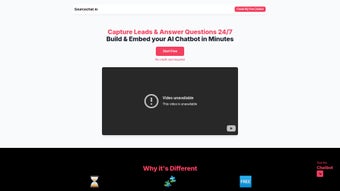
Sourcechat is a purpose‑built AI chatbot that speaks the language of entrepreneurs, startups, and small‑business teams. Designed to automate customer‑service dialogs, capture leads, and nurture prospects, Sourcechat delivers intelligent, context‑aware responses without demanding any coding expertise. Business owners can embed the chatbot directly onto their website, landing pages, or e‑commerce storefronts in just a few clicks, turning casual visitors into qualified leads while freeing up sales and support staff for higher‑value tasks.
The platform offers a free tier that supports a modest number of monthly messages, making it an ideal entry point for bootstrapped founders who want to test AI‑driven engagement before scaling. Premium plans lift messaging caps, unlock deeper training options, and provide advanced analytics, multi‑language support, and full branding control. Whether you’re looking to answer FAQs, schedule demos, or qualify inbound traffic, Sourcechat’s conversational engine adapts to your sales funnel and marketing workflow.
Its cloud‑based architecture means updates are rolled out automatically, ensuring you always have the latest natural‑language models and security patches. In short, Sourcechat combines ease of use, scalability, and affordable pricing to become a strategic asset for any growth‑focused organization. The solution also emphasizes data privacy; all conversations are encrypted in transit and at rest, and the service complies with GDPR and other regional regulations.
For teams that operate across time zones, the bot works 24/7, guaranteeing that every visitor receives an instant, helpful reply, which in turn improves conversion rates and reduces bounce. By leveraging a modern LLM backbone, Sourcechat stays current with language trends, slang, and industry‑specific terminology, ensuring that the dialogue feels natural and relevant to each user.
Key Features
Sourcechat packs a robust set of capabilities that address the most common pain points for small‑business owners looking to automate conversation. Each feature is designed to be accessible without a development team, while still offering depth for power users who need fine‑grained control. Below is a detailed breakdown of the core functionalities you’ll find when you start using the platform.
- Zero‑Code Embedding: Drag‑and‑drop widget or simple script snippet lets you add the chatbot to any website without developer help.
- AI‑Powered Conversations: Uses large‑language models to understand intent, handle follow‑ups, and deliver human‑like replies.
- Lead Capture & Qualification: Built‑in forms and qualification trees automatically gather contact information and score prospects.
- Multi‑Language Support: Supports over 15 languages, allowing global businesses to converse with visitors in their native tongue.
- Brand Customization: Change colors, avatars, and welcome messages to match your company’s visual identity.
- Analytics Dashboard: Real‑time metrics on chat volume, conversion rates, and user satisfaction help you fine‑tune performance.
- Free Tier & Scalable Pricing: Start for free with limited messages; upgrade to premium plans for higher limits and advanced training.
- Secure Cloud Hosting: End‑to‑end encryption and GDPR‑compliant data handling protect both your business and your customers.
- Integrations: Connects with popular CRMs (HubSpot, Salesforce), email marketing tools, and webhook APIs for seamless workflow automation.
- Continuous Updates: Automatic model improvements and feature releases keep the chatbot current without manual patches.
Beyond the list, Sourcechat offers a visual flow builder that lets you map out conversation paths using a canvas‑style interface. This visual approach reduces the learning curve dramatically compared with traditional rule‑based bots. Moreover, the platform’s API gives developers the option to extend functionality, trigger external services, or push conversation data into data lakes for advanced analytics. The combination of out‑of‑the‑box features and extensibility makes Sourcechat a versatile tool for both beginners and seasoned marketers.
Installation & Usage Instructions
Getting Sourcechat up and running is intentionally straightforward. Follow these steps to embed the AI chatbot on your site and start capturing leads within minutes:
- Create an Account: Visit sourcechat.io and sign up using your email or Google account. After verification, you’ll land on the dashboard where you can create your first bot.
- Configure Your Bot: Choose a template that matches your industry (e.g., SaaS, e‑commerce, consulting). Edit the welcome message, define common FAQs, and set up a lead‑capture flow using the visual flow builder. The builder lets you drag nodes for questions, conditional logic, and form fields without any scripting.
- Brand Your Chatbot: Under the “Appearance” tab, upload your logo, select brand colors, and pick an avatar that reflects your company’s tone. This step ensures the chatbot feels like an extension of your website rather than a third‑party widget.
- Generate the Embed Code: Once the bot is ready, click “Publish.” Sourcechat provides a tiny JavaScript snippet (≈1 KB) that you paste before the closing
tag of any page you want the chatbot to appear on. - Test the Interaction: Open the page in a private browser window and initiate a conversation. Verify that the bot responds accurately, captures contact information, and routes qualified leads to your chosen CRM.
- Monitor & Optimize: Return to the Sourcechat dashboard daily to review chat logs, conversion metrics, and user feedback. Use the built‑in analytics to identify drop‑off points and tweak the conversation flow accordingly.
Because Sourcechat is a cloud service, there’s no software to install locally, and updates are applied automatically. The platform works on any modern browser, meaning you can manage your chatbot from Windows, macOS, Linux, or even a mobile device. For teams that need deeper integration, the webhook feature allows you to push chat events to internal ticketing systems or Slack channels, ensuring real‑time notifications for high‑priority leads. Additionally, you can set up automated email follow‑ups that trigger when a visitor provides their email, turning a casual chat into a nurture sequence that continues beyond the initial interaction.
Compatibility: Web‑based (works on Windows, macOS, Linux, Android, iOS browsers)
Pros & Cons
Pros
- Intuitive, no‑code setup makes it accessible to non‑technical founders.
- AI engine delivers context‑aware, human‑like responses, improving user experience.
- Free plan enables small businesses to test the value without financial risk.
- Multi‑language capability opens doors to international markets.
- Robust analytics and CRM integrations streamline lead management.
- Continuous model updates keep the chatbot competitive with minimal effort.
- Visual flow builder reduces the learning curve for creating complex conversation paths.
- Secure, GDPR‑compliant hosting protects data and builds trust with visitors.
Cons
- Free tier limits monthly messages, which may be insufficient for high‑traffic sites.
- Advanced customization (e.g., custom NLP training) is only available on higher‑priced plans.
- While the UI is clean, power users might miss deeper scripting options for complex workflows.
- Dependence on internet connectivity; offline usage isn’t supported.
- Some users report a learning curve when setting up conditional logic for very specific sales funnels.
- Pricing for enterprise‑level features can become substantial as usage scales.
FAQ & Conclusion
Can I use Sourcechat on a WordPress site?
Yes. Sourcechat provides a simple JavaScript snippet that can be added via a WordPress plugin, theme header, or the Custom HTML widget. No additional plugins are required.
What happens to my chat data if I cancel the subscription?
Sourcechat retains your historical chat logs for 30 days after cancellation, giving you time to export data. After that period, the data is securely deleted in accordance with GDPR guidelines.
Is there a way to train the bot on my own product FAQs?
Premium plans include a “Custom Training” module where you can upload CSV files or use the built‑in editor to teach the bot specific terminology, product specs, and industry‑specific language.
Does Sourcechat support GDPR compliance?
Yes. All data is encrypted in transit and at rest, and the platform provides tools for consent management, data export, and deletion to meet GDPR requirements.
How quickly does the chatbot respond to a visitor?
The AI model typically replies within 1‑2 seconds, delivering a near‑real‑time experience that feels as responsive as a human agent.
In conclusion, Sourcechat stands out as a highly accessible AI chatbot tailored for entrepreneurs who need to automate conversations without diving into code. Its free tier lowers the entry barrier, while premium features—such as custom training, higher message caps, and deeper analytics—provide the scalability required for growing businesses. The platform’s multi‑language support and seamless integration with popular CRMs make it a versatile tool for both domestic and international markets.
If you’re looking to boost conversion rates, capture leads 24/7, and free up valuable human resources, downloading Sourcechat is a strategic move that pays dividends quickly. Ready to experience AI‑driven engagement? Sign up today and start your free trial.



.png)



